• This is Slide 1 Title

    This is slide 1 description. Go to Edit HTML and replace these sentences with your own words. This is a Blogger template by Lasantha - PremiumBloggerTemplates.com...

  • This is Slide 2 Title

    This is slide 2 description. Go to Edit HTML and replace these sentences with your own words. This is a Blogger template by Lasantha - PremiumBloggerTemplates.com...

  • This is Slide 3 Title

    This is slide 3 description. Go to Edit HTML and replace these sentences with your own words. This is a Blogger template by Lasantha - PremiumBloggerTemplates.com...

Tuesday, 1 August 2017

GBWhatsapp Latest Version 5.80 Now Available With New Features

The Gb whatsapp has now released the new latest version with more cool stuffs. Remember it's a moded app which works perfectly on the android 4.0upward and it's valuable than the ogwhatsapp,with some of it's features which let's you manage 2 whatsapp account in one android,send blank messages,hide last seen from your status,control your online status and some other features.


Features of the GBWhatsapp
  • Block calls for Specific Contacts.
  • Video Calling Working Perfectly.
  • You can Send Gif Images
  • Selfie Flash added.
  • Hide Last Seen for Specific Contacts.
  • Send Link to Join Whatsapp Group Publically.
  • Ban proof, No Issue of Ban your Account.
  • Now you can send broadcast to 600 people instead of 250 people.
  • Supports calls, No Worries about calling feature.
  • Hide your ( last seen ) Without any problem in One Click.
  • Privacy mods like Hide Second Tick etc.
  • Themes mods, choose any Theme of your Choice from the added Inbuilt Theme Store.0
    Theme Server ( to download/apply themes )
    Change ticks/bubbles Style Mod according to your own choice.
  • Counter statistics for groups.
  • Media preview without loading, much advanced and better than the normal whatsapp
    Show Online/last Seen in Main Screen so no worries about your last seen showing in other people’s device.


Here are the New changes in the GBWhatsapp 5.8
  1. Send video to size 100 MB instead of 16 MB, So now enjoy sending big video files with your friends.
  2. Send 90 images at once instead of 10. Now you can send bulk images without any issues at all.
  3. Change your status and add to 250 characters instead of 139 characters. Now Add Big Quotes in your Whatsapp Status Easily.
  4. Ability to press on links on chat screen without save sender number or group admin number
    Ability to press in links on your friends states, If your friends posted any link in status, you can open it with one click rather than typing it manually.
  5. The possibility of distinguishing between normal messages and Broadcast messages.
  6. Hide the name and the date when copy more than one message. So now you can copy bulk SMS without showing other people’s name ( Very good feature) .
  7. The possibility of copying friends status. Now Click on your Friend’s Status, and it will copy status of your friend to Clipboard.
  8. Change the app icon and notifications from settings.

How to Download
I'm sure you'll be interested and wanting to download this Gbwhatsapp.
Kindly click here to download the Gbwhatsapp

You can install the app after download complete and start enjoying the gbwhatsapp.
Note:Before you install, check your Settings»Security» make sure 'Unknown Sources' field is ticked/marked.
Normal app installation is used,no addition.

Enjoy,share and comment.

Sunday, 30 July 2017

Airtel SmartConnect Reloaded With More Additional Benefits Called "Ovajara" - Check out The Back2Sender Offer

Airtel has rebranded the SmartConnect plan which previous offers X8 bonus on every recharge,but now the SmartConnect Plan now offers x8 of your recharge and gives you back the whole amount of your monthly recharge as data bonus reward.


The newly rebranded package gives customers the total equal value of their recharge after the end of a previous month and reward them the total recharge as data bonus.

For example,a customer who recharges N200, receives the N200 in his main account and receives a bonus of N500 for voice calls, N500 for data, with an additional N200 airtime to call family & friends, and an extra bonus of NGN 200 for social (WhatsApp, Twitter, Facebook and BBM), which makes a total of NGN 1600 airtime on every NGN 200 recharge. As additional benefit, the customer then gets a data bonus worth of N200 at the end of the month.

Also recharge of NGN1000 gives NGN 2,500 bonus for calls to all networks, another NGN 2,500 bonus for data (500MB) and NGN 1000 airtime for calls to family & friends. Customers will also receive extra N1000 airtime for access to social media. By the end of the month, data bonus of N1000 is given to the customer.

When Does it Expire?
It expires in seven days, that's for the bonus but the amount you recharge on your main account balance never expired untill it's exhausted.

Notes:
This plan comes with all airtel simcards without so no need to think of where to migrate.
1. A smartconnect user can only get the x8 bonus forever but for the data bonus,it's valid for just 3 months.
2.SmartConnect 4.0 users should recharge N200 and above,any recharge less than N200 gives only X8 bonus,no data bonus.

To Check Your Balance,dial *123#.

Goodluck!!!

Friday, 28 July 2017

Glo 0.0kb Free Browsing Via Tweakware is Still Blazing

The Glo free browsing cheat which has been rolled out a long time is still blazing and working perfectly.
However,only few may enjoy it in case of the Glo's poorest network in the country.


The APN settings for this Glo free browsing is compatible with whichever VPN you use either Tweakware,psiphon handler,AnonyTun,Stark VPN ETC.

I'll explain only the tweakware version of the cheat and the latest APN settings you need,it's all free and easy.

New Glo Access Point for Free Browsing

  • On your android,goto your mobile settings
  • Scroll down and click 'More'
  • Tap on networks
  • Select Access Point Names
  • NAME: WizyTechs
  • APN: X_Ultra®176.0.78.54/2000ms
  • Now Save the settings

To Set Up The GLO Free Browsing Via TweakWare
»Download Tweakware VPN (Google Playstore) or
Alternatively,download it Here
»Open the downloaded Tweakware and Click on Settings
»Tap on Custom Tweak and Set as Below:
»Select Connection Mode: Http
»Sever Port: 8081
»Host Header: redirect.glo.com
»Mark: reverse proxy port
»Proxy Host: redirect.glo.com
»PROXY PORT: 8081
Once done,go back to The App index and select CUSTOM and Click Connect.
Enjoy it while it still lasts.

Thursday, 27 July 2017

Whatsapp Now Has 1 Billion Users Active On Whatsapp in A Single Day

In every global social media,whatsapp is now the highest with the highest rank of use and popularity in the universe.
Today,whatsapp is being used by 1billion users per day(1day)

Last year, it was on Whatsapp blog that it's used by 1 billion users in a month,and now it's one billion in a single day.


No other social messaging app has been used upto this,even the facebook with it's popularity not all users uses it.
Facebook - announced last month that it now has 2billion users in just a month.
Snapchat - receives 166million users in a single day
Instagram - Also announced last year that it has upto 250million active users daily.


Now,if we come into the aspect of monetization with this huge social messaging apps,what if a website with adsense receives upto these users as a pageviewer into his webpage is he/she not a billionaire?

Wednesday, 26 July 2017

Registration for MTN Personal Assistance to COO for Graduates Now Available

MTN Nigeria is now allowing registrations for a certain post in their company.
We all know MTN is the most leading telecom and trusted in Africa and Middle East and it's a great choice for graduates by bringing employment offerings to work as the Personal Assistance to COO


PA Job Description

  • Act as a point of contact to the executives,handling confidential mails,making telephone calls etc.
  • Train and maintain efficient documentation and filling processes
  • Checking documents for Executives review to ensure quality control and compliance to MTN policies.
  • Performing a diversity assistance to the secretary and administrators by writting of reports using spreadsheet etc.
  • Manage sensitive matters and information regarding peculiar issues within the department.
  • Check on assigned Executives presentations, to ensure proper formatting within the department.
  • Co-ordinate and manage Executive calendars, travel arrangements and schedules, negotiating potential conflicts and determining feasible alternatives.
  • Bringing monthly activities from different units within the assigned departments for executives review.
  • Lay down meetings within the group and host visitors on behalf of the Executive.
  • Attend and give replies to customers request or complaints.

What are the conditions needed?
Normal MTN terms and conditions are required as you may be required to work for extended hours.

Here are the Experience,Qualifications and Trainings Required
  1. Customer care attention
  2. First degree in any related job discipline
  3. Very smart and good in English in the area you are.
  4. Microsoft office suite training
  5. Perfect Writting Skills Needed
  6. Assisting the Non-finance workers
  7. Accounting Skills
  8. Good performance and heeding to the department application

Lowest Qualifications Allowed
BA, HND,BEd, BEng, BSc or BTech

How to Apply
Click here to apply if ready and qualified for the job.

Saturday, 8 July 2017

Download BetaGol To Use Glo 0.0kb Free Browsing Cheat on PC

Glo 0.0kb unlimited free browsing has been one of the best and longest cheat this year for Android users especially those fortunate to be residing in areas with strong Globacom network. It basically works with the help of VPN apps like Tweakware, Stark, AnonyTun, Psiphon, UC mini handler and the likes but PC users were deprived just as iPhone users are always left out.


Now you can enjoy Glo free browsing cheat on your PC via BetaGol.exe App which can be installed on Laptops and desktop computers running virtually all Windows versions.

BetaGol VPN App is a PC version of Tweakware and it's used for Glo 0.0kb free browsing as well as other cheats which will be cracked and posted on this blog soon. So get ready for the configurations as it's easy to use via a Wi-Fi, modem or any device which gets your connected to the internet on PC. Isn't that interesting?
To enjoy Glo unlimited browsing and downloading via PC, follow the steps carefully.


REQUIREMENT
1. Your Glo SIM Card with 0.0KB balance
2. A Strong 3G Network
3. Download Java Run Time App for PC
4. Download BetaGol for PC
5. Register For Tweakware Premium
6. Your PC
7. Internet connection medium (Modem, Dongle, Smartphone etc)


BETAGOL VPN SETTINGS FOR GLO 0.0k FREE BROWSING FOR PC
✔ Ensure you have downloaded the above required files, get a Tweakware premium account in Step 5 by paying just N500. It valid for one month

✔ After that, Install BetaGol for PC as well as Java Run Time App you downloaded from the links i provided above

✔ Now open the App and log in with your details then click START and wait for few monutes for it to connect.

✔ Once connected, launch your favourite browser and enjoy unlimited downloads with Glo.
IMPORTANT: For downloading via Internet Download Manager (IDM) using BetaGol for PC, setup your IDM like this:
Proxy: 127.0.0.1
Port: 8080

ADVANTAGES OF THIS BETAGOL PC CHEAT
✔ It's unlimited
✔️ It can be used for web browsing, downloading and streaming videos
✔️ You have the freedom to access all websites including restricted ones
✔️ It's easy to setup
✔️ It supports Modem, WiFi and Smartphone connection via tethering

DISADVANTAGES
✔ It requires minimum of N500 for Tweakware premium subscription which expires after a month but continues running once your resubscribe.
✔ Free users can't enjoy this cheat

What do you think about this? Though it requires premium account but considering the fact that this tweak is unlimited, I think you should give it a try. But please don't waste your time and money if Glo network is not strong in your location.
Wizytechs blog

Posted from: https://spottyk.blogspot.com/2017/07/download-betagol-to-use-glo-00kb-free.html

Friday, 7 July 2017

How to Easily Get 200MB Free Data On Glo For 7Days

Nigeria telecoms are really dishing out alot of surprises at these moment of recession.
Glo which recently launched a welcome back promo which gives alot of benefits is now bringing a new freebie for it's users.


Glo Nigeria is offering free 200mb to it's constant recharging users meaning for those who recharge alot to call,sms,browse,and also for all Glo subscribers.
What You Need to Get The Offer
All you need is just to be a user who uses up at least N250 daily to browse,call or sms.

Is it trusted?
Yes it is, it's not a cheat or what you'll need to start powering up VPN'S
It was officially announced by Glo so it's really trusted and works on all browser enabled phones.


How to Start Getting The 200MB
It's simple,just follow the requirements above by spending at least N250 and you'll start your sim will start whooping with 200MB which is Valid for 7Days.

You can check the balance by dialing #122#

Thursday, 6 July 2017

Download BlazeOn App For Etisalat Timely Base Unlimited Data Plan


Etisalat has Introduced time base data plans known as BlazeOn for unlimited browsing and downloading. I think is a welcome development and will be of great benefit for those of you that have some heavy files to download and also fast Etisalat network. Recall that Airtel was the first to introduce timely based data plan back in 2015 and it was subscribers favorite because you can download unlimited with it for 1hour with just N180 although something went wrong later along the line when they increased the price and the plan gradually fade away. Etisalat timely base data plans is made possible via an app called BlazeOn, powered by Comptel’s FWD solution. According to Etisalat “Most Internet users in Nigeria don’t know how much mobile data they consume while browsing or streaming", hence the launch of BlazeOn. For now am sure the app is available for Android users but might be rolled out for iOS devices soon. But let's look at the plans, prices and how they work below. ETISALAT BLAZEON DATA PLANS You can get 10min for N50, 15min for N70, 30min for N120 or go for the 1hour plan. Within the jurisdiction of this usage, you can download unlimited until your time expires. How to Activate Download it at playstore here or right here Note: this plan is advisable only if Etisalat network in your area is very fast otherwise you might regret it. In this case, time na money. What do you think?

Saturday, 13 August 2016

MTN XtraBytes: Now You Can Borrow Data From MTN

MTN will always have different ways to extort money from each of their customers,even when you don't have plans to recharge,they'll try to convince you to recharge.

Wednesday, 10 August 2016

100% Double Data Offer - Double Your MTN Data Via IMEI Tweak

Hello guys, don’t dull yourself out in this double data offer. It is time to double up your data in any of the purchases made. I’ll make it pretty simple for you to understand.

How to Tweak IMEI Number on Android Phone

Imei tweaking really helps people especially those who loves cheat or browsing freely with androids. Let me explain this process with an example.

Tuesday, 9 August 2016

Glo Officially Launched TGIF Bundle - Enjoy 3GB For Just N500

I wonder why Globacom thought that this is the right time to officially launch their Night and Weekend Plans. The plan that has been in existence since last year December, Glo had to officially launch and renamed it—Thank Glo It’s Friday (TGIF).

Etisalat Introduced Night Data Plan - Get 1GB For N200

I don’t know who gave this specific telecom this ridiculous Idea but I think it is one of the most craziest plan I’ve ever seen. So the dude suggested it and Etisalat accepted it?

Let me go straight to the point.

Airtel Introduces Night Data Plans: 500MB for N25 and 1.5GB for N50

Formely MTN made a data plan like this which everyone loved it especially those large file downloaders out there.

Monday, 1 August 2016

MTN Finally Launches the Best Plan With Cheapest Call Rate 11k/sec

We've waited enough,all the offers we've been enjoying were for surfing the internet only.None was made for us to call.

Finally MTN has just brought back the best calling plan,we've been expecting since last year.

How to Renew the MTN Night Plan for N25

I've just discovered that after paying N25 for the MTN Night Plan 12am-4am,the renewal for the plan isn't working,I mean after paying for it the first time,then trying to pay the second time isn't allowed it says something like "You're either not on MTN Ipulse Plan or you have an active subscription" and it doesn't work.

Glo Introduce New Packages: Talk Special & Reloaded Twin Bash

Most network providers hates watching other colleages taking away their users.In Nigeria our network providers do copy others before knowing what to do,isn't it? MTN,Airtel,Etisalat copied Glo for the 1k for 1.5gb plan,why don't other networks launch it quickly?.

Saturday, 9 April 2016

How to Browse on Your MTN Line With Airtime

MTN users have been suffering with their sim cards and not being able to browse through airtime especially when data is exhausted and not everyone can afford puchasing data's,that's why this post is here to help those users facing these problems in order to get it solved,just a code will be dialed then you're ON.

Monday, 21 March 2016

Get 4.5GB Data Plan On Airtel

Airtel has just introduced a new data offer which you'll get 4.5GB data for just 2k for a month,and i think this plan is very cheap and very nice with a good network with fast internet connection,and I heard that one plan was on airtel before it was blocked where user get 4gb for just 1,500 and most users enjoyed it an now there's another best offer again which I'd know users can enjoy but unfortunately the plan is not eligible for all users but a lot of airtel sim cards qualify for the plan and also for you not to waste credit you'll need to know either your Sim card is eligible and there's a way to do that.

How to Know Either You're Eligible

  • You can actually test either you're eligible before recharging the credit so before you recharge dial *440*161#
  • After dialing the number then wait to recieve a message,if the message says: "Dear customer, you do not have sufficient balance for this plan.”Then that means you're eligible for the plan
  • Then you can now proceed in recharging the amount
  • But if you dialed the code and got a response that says:“Dear customer, you do not qualify for this plan”,then don't load the money on it because it will not work for that line, but you can try any other airtel sims,at least one would work.
Now that we've discovered how to be qualified and we're qualified now follow the procedures on getting the offer
  • Recharge the N2000 and dial *440*161# or *437*1#
  • You'll be credited with 4.5GB data bundle for 30 days
  • After being credited,dial *141*712*0# or *123*10# to check your data balance.
That's all,you can start enjoying this offer as from now and don't.

Don't read and get out but remember to comment and share to others,Good Luck.

Wednesday, 16 March 2016

How To Fix Androids Not Connecting Through Psiphon Or Simpleserver

It is confirmed that many android phone apps do not connect whenever you use SimpleServer or Psiphon,only a few apps work when trying to connect to the internet,apps like Whatsapp,BBM,2go,Facebook,Badoo,Instagram,Google Play Store and others,they refuse to connect through Psiphon or SimpleServer but this post is here to help those users facing this problem on their phones.
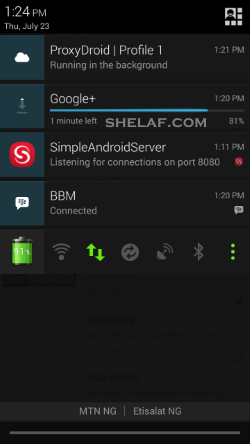
Here is an image of the app needed and connecting through Psiphon to BBM from Shelaf.com


One is AutoProxy and the other one is proxydroid,one of these two's are needed for the tweak,but before carrying on make sure you have an active subscription to browse through simpleserver or psiphon,or the 150MBcheat from MTN and the last point make sure your phone is rooted before perform this step

SimpleServer or Psiphon Configuration Settings for AutoProxy

  • First of all, download AutoProxy.apk here.
  • Install and launch the AutoProxy you downloaded and tap on the Plus Sign ( ) at the top right corner of the App interface, it will reveal the default settings for the Proxy Host, Proxy Port and Host type.
  • Tap on the Proxy Host and enter this IP:127.0.0.1 then press OK.
  • Tap on the Proxy Port and enter PORT:8080 then press OK.
  • Now tap the Proxy Type and select HTTP.
  • Go back to the AutoProxy homepage and you will see the HTTP icon as the only icon located at the top left corner of the white page homepage.
  • To connect the AutoProxy, you will need to connect your SimpleServer or Psiphon first. So start up your SimpleServer or Psiphon and then come back and connect your AutoProxy app from the homepage. Your entire Android app will now be powered to access the internet via SimpleServer or Psiphon!
SimpleServer or Psiphon Configuration Settings for ProxyDroid.

  • First of all, download ProxyDroid.apk here.
  • Launch your ProxyDroid after you must have downloaded it to your phone.
  • Then enter these IP in the Proxy Host 127.0.0.1 and Port: 8080
  • Now, look up and Switch ON the ProxyDroid, but remember to connect your SimpleServer or Psiphon first, then come back to ProxyDroid and tap on Switch OFF to switch it ON and you can now minimize it.
  • Launch any application on your Android device and it should connect perfectly.
  • You are also free to access Google Play Store with any of these applications via SimpleServer or Psiphon.

    Note:I said you can choose one out of the both apps and don't use the both together at once.

    Do not forget to reply or share this post with other users if found this post helpful.